
Decision lab
MoCA backhaul decision lab
Check whether your coax can carry wired backhaul, how many adapters you need, where the PoE filter belongs, and when to stop before buying parts.
Run the checker Print checklist Troubleshoot MoCA
Choose what you know, then get one next step. This checker uses your answers; it does not measure your coax or confirm compatibility.
1. Enter what you know
Your next step will appear here after you review your choices.
MoCA is a good next test
You appear to have coax at both ends. Inspect the splitter/filter path before buying, then test one wired node first.
No purchase required to use this result. Follow the check first; a result is not proof that your connection is fixed.
Adapter count
2 adapters for a standalone link.
First physical check
Find the first splitter and confirm it is MoCA-rated.
Gateway route
If gateway MoCA is available, you may need one room-side adapter. Otherwise use a pair.
Shopping gate
Do not buy until the coax path is proven between the two jacks.
Splitter/filter guide PoE placement Adapters after diagnosis
After trying the guidance, did it solve your problem?
Optional: choose one only after testing your connection. A fix without buying anything counts.
Work through the MoCA troubleshooting checklist. You do not need to buy more equipment to send feedback.
We use optional button responses in our existing analytics to improve this guide. No form answers or household details are sent with these events. Analytics blockers may prevent recording. Privacy details.
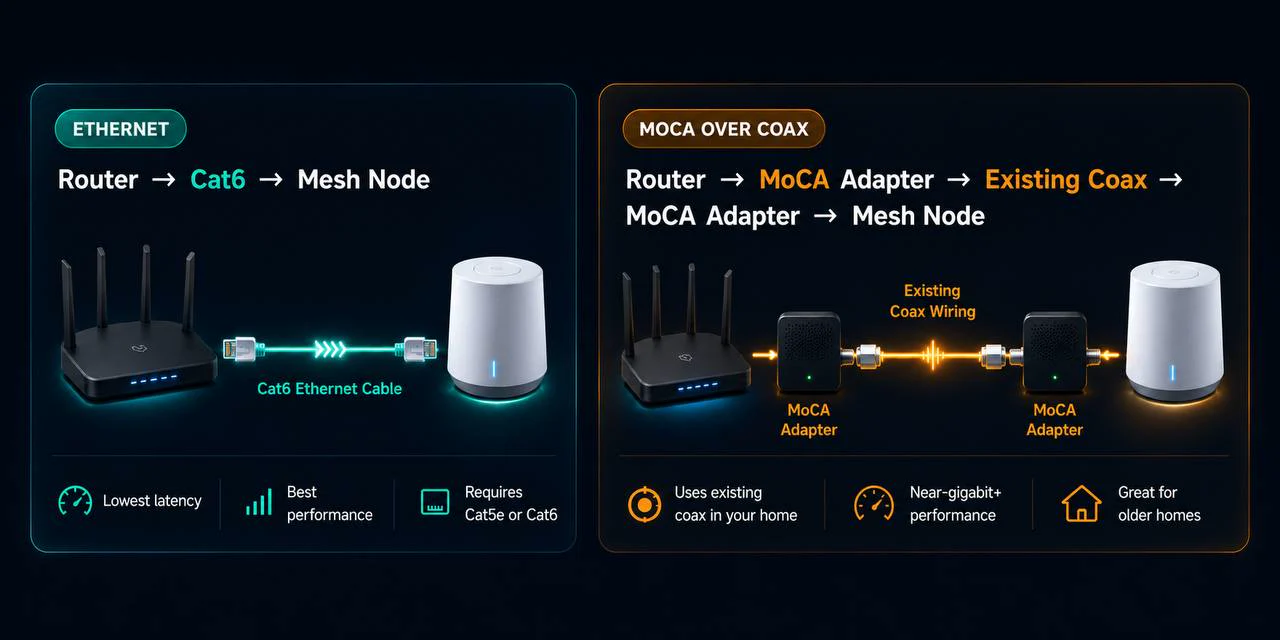
2. Topology reference
3. Decision matrix
| Result | What it means | Best next click |
|---|---|---|
| Likely ready | Coax exists at both ends and no obvious blocker is known. Test one path before expanding. | Adapter count |
| Inspect splitter/filter first | The physical coax plant is the risk. Old splitters, missing filters, and amps cause most failures. | Splitters and filters |
| Risky/shared coax | Cable TV/internet, apartment coax, or unknown entry hardware means isolation matters before you energize MoCA. | Apartment/coax cautions |
| MoCA is not first | No coax at one end, or the issue is probably placement/RSSI instead of backhaul. | Dead-zone diagnosis |
Field validation notes
These are the failure patterns this checker is designed around, based on the August MoCA/backhaul review queue.
Splitter changes break internet
When internet drops after adding a MoCA splitter, restore the modem's simplest known-good coax path first. Then add the router-side adapter and one room-side adapter before rebuilding the whole splitter tree.
Gateway MoCA is not the same as ready coax
Xfinity, Fios, Cox, and Frontier setups can reduce the adapter count, but only after the gateway's MoCA LAN is enabled and the room jack is on the same filtered, MoCA-rated coax plant.
Mesh app still says wireless
If a laptop works through the room-side adapter but the mesh node stays on wireless backhaul, reboot the node wired, test adapter to node directly, and remove any switch until the app reports Ethernet.
Do not buy yet gates
Use these as stopping points before adding adapters, filters, or splitters. The August product-fit review flagged the MoCA pages as a place where recommendations should appear only after they remove a real install blocker.
| What you see | What to prove first | When shopping makes sense |
|---|---|---|
| No coax jack near the router or target room | Confirm whether Ethernet, a better node location, or a different access point path is possible. | Skip MoCA gear until both ends have a usable coax path. |
| Unknown splitter panel or unlabeled coax hardware | Find the first splitter, remove blockers, and verify both jacks land on the same coax tree. | Buy splitters or a PoE filter only after you know what part is blocking the path. |
| Gateway says MoCA is available | Confirm the gateway is bridging LAN over coax, not just showing a TV/STB MoCA setting. | Buy one room-side adapter only when the gateway-side MoCA LAN is confirmed. |
| Mesh app still reports wireless backhaul | Test a laptop through the room adapter, reboot the node wired, and remove switches until the app sees Ethernet. | Replace adapters only after the coax link works with a direct wired client. |
Measure one room before expanding
Use the lab as a field test, not a shopping list. Prove that MoCA fixes the actual weak room before buying adapters for every coax jack.
| Measure | Before MoCA | After one wired node |
|---|---|---|
| Wi-Fi signal in the weak room | Run the same phone/laptop spot check and note RSSI or signal bars. | The client should roam closer to the wired node, not cling to the router. |
| Speed at the same seat | Run two tests: one near the router, one in the weak room. | The weak-room result should move closer to the router-room result. |
| Latency or video-call stability | Watch for spikes while someone streams or uploads elsewhere. | Loaded latency should feel steadier because the mesh hop is no longer wireless. |
| Mesh app backhaul status | Confirm whether the node reports wireless before the change. | Reboot the node and verify it reports Ethernet or wired backhaul. |
Run the Wi-Fi walk test Check loaded latency Node still says wireless?
4. Gateway-specific routes
Xfinity / Comcast
XB gateways may expose MoCA LAN. Confirm the setting, add a PoE filter at entry, then use a room adapter if the gateway is the MoCA bridge.
Frontier / eero
Fiber service may not use coax for WAN, so the old coax can be repurposed for LAN backhaul if the splitter tree is connected.
Verizon Fios
Separate MoCA WAN/STB needs from MoCA LAN. A Fios router may supply LAN over coax, but two adapters can be cleaner for mesh-only setups.
Cox
Gateway support varies. Treat the coax plant like cable ISP coax: entry filter first, MoCA-rated splitters, then gateway MoCA or adapter pair.
Spectrum
Expect a standalone two-adapter setup more often than a gateway-MoCA setup. Verify splitters before blaming adapters.
Generic two-adapter path
One adapter near the router, one near the target room, Ethernet from the room adapter into the mesh node or switch.
Printable MoCA wiring checklist
- Confirm coax near the router/gateway.
- Confirm coax near the target room or mesh node.
- Find the coax entry point or structured media panel.
- Identify the first splitter that feeds the rooms.
- Read splitter labels; replace old 5-1000 MHz parts with MoCA-rated splitters.
- Bypass or remove amplifiers that block MoCA frequencies.
- Place the PoE filter before the first splitter when coax touches cable/shared service.
- Test one clean coax path before expanding to more rooms.
- Connect gateway MoCA or the router-side adapter.
- Connect the room-side adapter to one mesh node or a switch.
- Verify Ethernet link lights and a wired client speed test.
- Verify the mesh app reports wired/Ethernet backhaul after rebooting the node.