
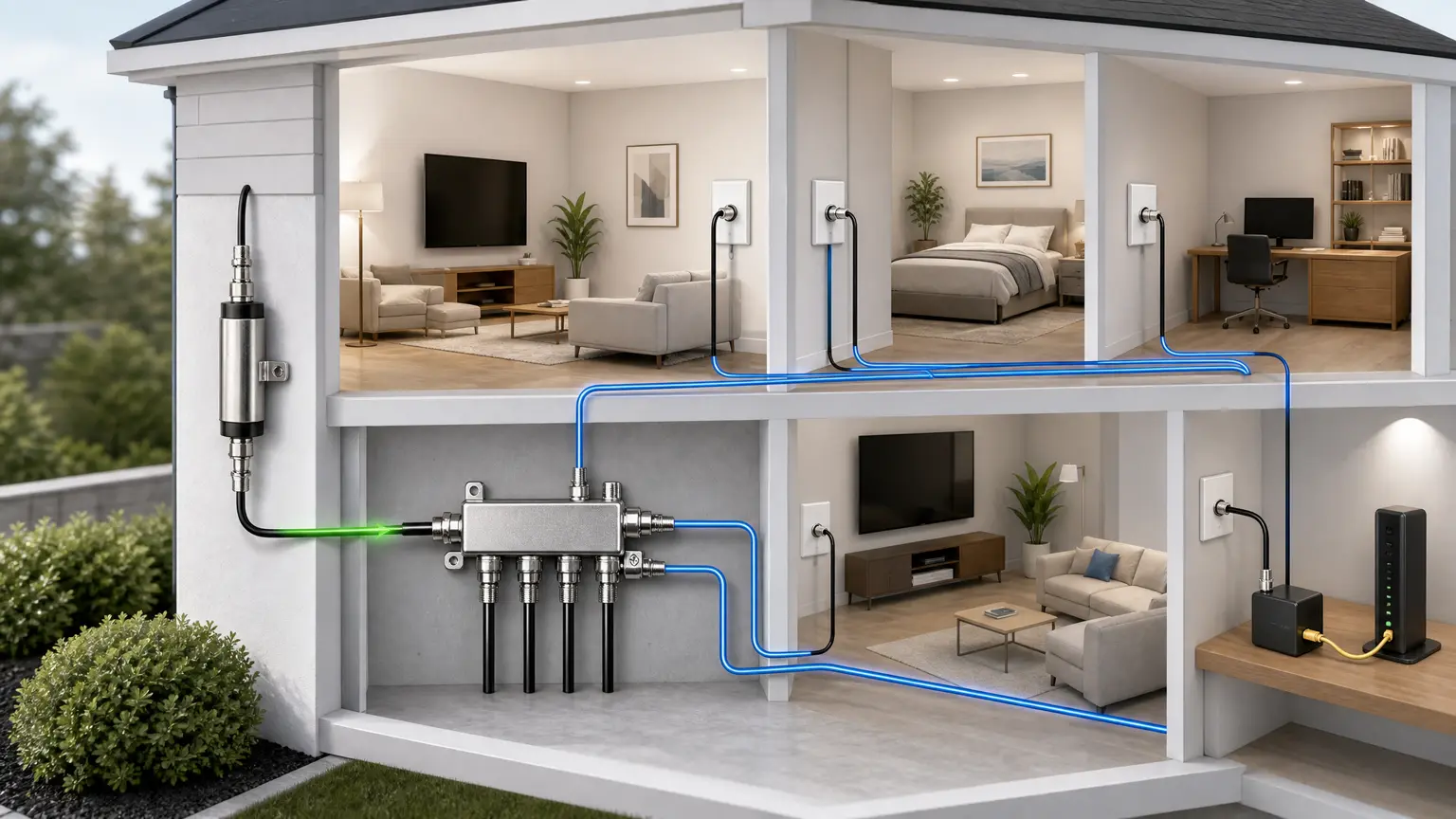
Quick answer: do not buy a splitter and filter just because MoCA is slow. First identify which coax joins the rooms and whether it also carries cable internet, satellite, TV, or a provider's ONT-to-router connection. Keep a working, compatible splitter. Choose a filter only after its location and passband are confirmed for those services.
Scope: this is a residential LAN backhaul guide, not a provider WAN wiring diagram. The goCoax MA2500D documentation is the band example below; check your exact adapter model and manual rather than assuming every MoCA device uses the same settings.
Do I need a splitter, filter, or neither?
- A separate, isolated room-to-room coax run: if two compatible adapters link reliably over that run, do not add a splitter or entry filter just to complete a shopping list. There is no provider entry to filter on that isolated link.
- Multiple rooms on an existing splitter: identify the splitter and confirm explicit MoCA support in its specifications. If the existing part supports your band and the link passes testing, keep it.
- Active cable internet or TV: get the provider's current MoCA/filter plan before changing the shared path. A filter must pass the wanted provider spectrum while containing the intended LAN MoCA band.
- Fiber with coax still in use or an unknown connection: stop and identify its job. Frontier's Sagemcom instructions include a MoCA WAN/LAN port. Fiber service does not prove the coax is unused. Use the Frontier WAN-versus-LAN check.
- Satellite or shared-building coax: do not alter that service wiring. goCoax's notes say standard D-band MoCA overlaps satellite TV frequencies. Ask the provider or building manager about a separate approved LAN path.
What makes a splitter suitable?
goCoax specifies MoCA-capable splitters passing 1125–1675 MHz for the MA2500D setup. A printed upper frequency alone is not a compatibility test: a 2400 MHz satellite part is not automatically a MoCA splitter. Check the model's documentation, the ports actually joining your rooms and any amplifier between them. The coax splitter checklist and splitter-loss guide explain the physical checks.
What a Point-of-Entry filter does
A MoCA Point-of-Entry filter blocks its specified MoCA band across that boundary; it is not Power over Ethernet. It must not sit between the MoCA peers that need to communicate. It is not a substitute for tracing the wiring.
Placement depends on the service
In a provider-approved cable layout, an entry filter may sit on the provider side of the first in-home splitter, with the intended LAN peers on the home side. That is an example, not permission to filter any incoming coax. A Frontier WAN link, an isolated coax pair and a shared cable/DOCSIS path are different cases.
DOCSIS limitation: goCoax's page includes a modem-side filter example for certain higher-frequency modems. Do not apply that diagram blindly to your ISP: confirm the active downstream frequencies and the filter's passband with the provider first. A filter that blocks wanted service is not a fix. See filter placement for the layout questions.
Verify the failed layer before spending
The following is a proposed reader check, not a test result from this site:
- Record the adapter and splitter models; sketch the accessible coax path. Do not disconnect provider equipment, building wiring or an active WAN link to run a generic test.
- If you already own two compatible adapters and have a spare short coax cable, follow their manual for an isolated adapter-to-adapter link check, separate from service wiring. Use the manual's LED meanings, not a universal color rule.
- If that passes but the confirmed LAN room run does not, check which splitter legs join the rooms, cables and any amplifier. Change one confirmed LAN-side item at a time. Do not blindly bypass powered service equipment.
- With the link established, compare a wired LAN file transfer or iPerf test at the remote adapter with the same endpoints on Ethernet. Then test the intended mesh node in its final room. Repeat under similar conditions and note drops as well as speed.
Pass means: repeatable connectivity and throughput adequate for your own use, with existing service unaffected. No universal Mbps result is promised. Slow internet alone does not isolate a coax fault; Ethernet ports, endpoints and the ISP can limit the result. If the isolated adapter link fails too, use the adapter manufacturer's support path before replacing every splitter.
Buy only the part the checks justify
Replace an incompatible splitter or damaged LAN jumper when it is the identified gap. Add a filter only to the confirmed service-specific location. If the checks pass, the no-purchase answer is to keep the setup. New adapters are not a cure for an unknown coax path.
Stop conditions and next steps
Do not change provider adapter modes, open service equipment, over-tighten connectors or treat an unfamiliar amplifier as disposable. Follow the equipment's connector instructions. Unknown WAN, satellite or shared-building wiring needs provider confirmation.
- Understand MoCA first or compare adapters when an adapter is the actual missing part.
- Troubleshoot a failed MoCA link before buying replacements.
- Compare the starter bundle only after you know which parts are missing.
- Set up MoCA for mesh backhaul once the wired path works.
- Compare MoCA, Ethernet and powerline if this coax path is unsuitable.
Parts only if the checks show a need
Keep working parts. Confirm splitter support and the service-specific filter plan before ordering.
MoCA-rated splitter
Best for: MoCA installs
- Reduces MoCA issues
- Cheap fix

MoCA POE filter
Filter, MoCA POE for Cable TV & OTA coaxial Networks ONLY
Best for: MoCA installs
- Improves MoCA reliability
- Often recommended

RG6 coax cable
GE RG6 Coaxial Cable, 25 ft. F-Type Connectors, Quad Shielded Coax Cable, 3 GHz Digital, In-Wall Rated, Ideal for TV…
Best for: MoCA installs, coax cleanup
- Replace mystery coax jumpers
- Cheap reliability upgrade
Sources and review · 2026-09-12
Documentation checked September 12, 2026 with AI-assisted research. No hands-on equipment test is claimed.
Applies to: Residential LAN MoCA; goCoax MA2500D band example. Not a satellite, shared-building, Frontier WAN, or all-DOCSIS wiring plan. Adapter model, firmware, filter passband and active ISP spectrum must be checked for the actual installation.
Publisher: Matt Conrad. Editorial policy.