
How to fix Wi‑Fi dead zones
Quick answer: fix dead zones by (1) measuring signal, (2) fixing placement, and (3) adding wired backhaul (Ethernet or MoCA) if mesh hops are inconsistent. This guide walks you through that in order so you don’t buy the wrong thing.
If you searched for a Wi‑Fi dead spot, that’s the same thing: an area where signal is too weak (or too noisy) to be reliable.
On this page
Dead zone vs dead spot (is there a difference?)
In everyday use, dead zone and dead spot mean the same thing. What matters is why it’s dead:
- Coverage problem: weak signal (distance/walls/placement)
- Stability problem: the hop between nodes is weak (wireless backhaul)
- Interference problem: crowded channels (common in apartments/townhomes)
This guide separates those quickly so you don’t buy the wrong thing.
The steps below work for homes and small offices — business Wi‑Fi “dead zones” are usually the same physics, plus more interference.
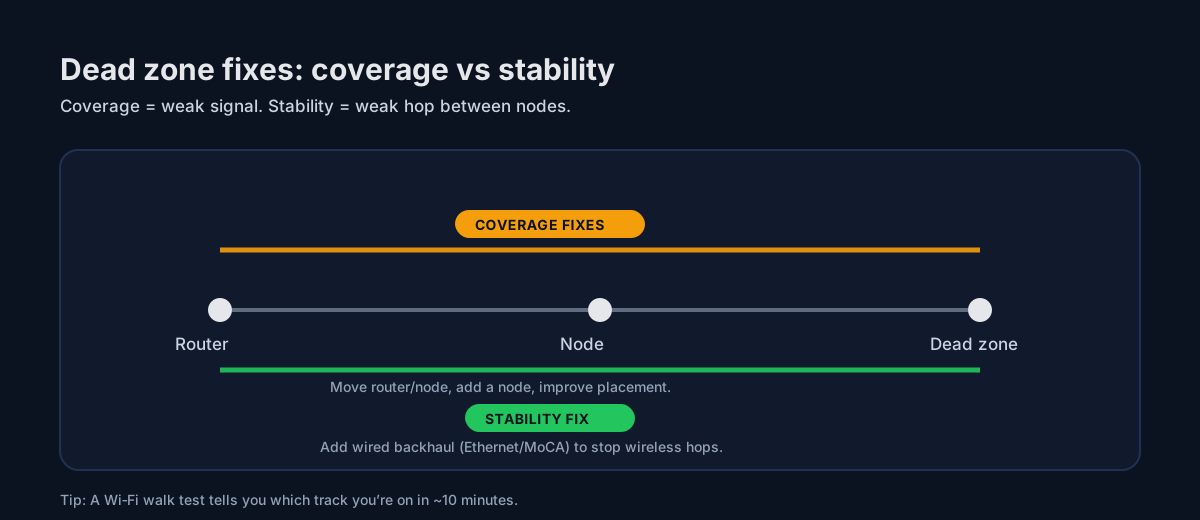
Quick picture: coverage vs stability
Dead zones are usually either weak signal (coverage) or a weak hop between nodes (stability/backhaul). The steps below separate the two fast.
Quick win
If you do only one thing: run a Wi‑Fi walk test. It tells you whether you need more coverage or more stability.
Step 1 | Confirm it’s a real dead zone (not a device issue)
- Test with two devices (phone + laptop) in the same spot.
- If one device is bad everywhere, it’s the device.
- If every device is bad in one area, it’s coverage/backhaul.
Step 2 | Measure signal strength (stop guessing)
Use RSSI (dBm). It’s a simple number that correlates strongly with ‘this area feels dead.’
Step 3 | Fix placement before buying anything
- Move the main router/node toward the center (don’t bury it in a closet/cabinet).
- Don’t place nodes in dead zones. Place them where signal is still strong and let them ‘carry’ coverage.
- One node per floor (near the stairwell) is often better than three nodes on one floor.
Step 4 | Choose the right solution path
Path A: Mesh (coverage + roaming)
Best when you need whole-home coverage and seamless roaming.
Product picks: Products (eero/Deco/Orbi)
Path B: Wired backhaul (stability)
Best when mesh feels flaky, walls are dense, or the layout forces multiple wireless hops.
Step 5 | Backhaul cheatsheet
- Ethernet: best if you can run a cable. Start here: Ethernet backhaul basics.
- MoCA: best ‘no drywall’ option if you have coax. Start here: What is MoCA?.
- Powerline: last resort. Read: Powerline adapters.
What to buy first (bundle-first)
Reliability add-ons (works with most setups)
If you’re trying to make a home ‘just work,’ backhaul accessories are often a better spend than an extra node.
Cat6 Ethernet Cable
Best for: wired mesh nodes, workstations
- Reliable backhaul
- Cheap performance upgrade
Unmanaged Gigabit Switch (8‑port)
Best for: wired backhaul, home office, multiple devices
- Adds Ethernet ports
- Plug-and-play
MoCA 2.5 Adapter (pair)
Best for: mesh backhaul, basements, dense walls
- Turns coax into Ethernet
- Great for wired backhaul
- Often cheaper than rewiring
MoCA POE filter
Best for: MoCA installs
- Improves MoCA reliability
- Often recommended
Common edge cases
- Garage/outdoor: treat it like a separate zone; wired backhaul or a dedicated outdoor AP is usually best.
- Townhomes/apartments: interference matters; don’t over-deploy nodes.
- Smart home devices: many live on 2.4 GHz; stable coverage beats peak speed.
Next steps
- If you’re stuck: Troubleshooting hub
- If you have coax: MoCA starter bundle
- If you’re budgeting: Wi‑Fi extenders (when they work)