
Deco X55 (3-pack)
View on Amazon ↗Why it works
Great value, Good coverage, Good app
Best for
budget, 2000-5000 sqft
This guide is for households using Optimum. We'll cover the common setup pitfalls (gateway mode, double-NAT) and safe mesh picks.
ISP setup checklist
Optimum note: The two biggest wins are (1) avoiding double-NAT and (2) getting the Wi‑Fi source out of the corner via placement or backhaul.
What to do first:
Most ISP gateways ship in a corner of the house (utility room, closet, far wall). That’s a recipe for dead zones. If you can’t relocate the gateway, plan on placing your first mesh node near it and using a second node to ‘carry’ coverage toward the center.
Pitfall #1 is double‑NAT. It’s not always obvious, but it can cause flaky gaming/VoIP and painful troubleshooting later. The fix is usually one of these: set the gateway to bridge mode, or run your mesh in access point (AP) mode.
Pitfall #2 is expecting Wi‑Fi to behave like Ethernet. Congested bands and dense walls mean your best ROI is placement + backhaul, not chasing peak advertised speeds.
As an Amazon Associate I earn from qualifying purchases.
| Pick | Why it works | Best for |
|---|---|---|
| Deco X55 (3-pack) Amazon ↗ | Great value, Good coverage, Good app | budget, 2000-5000 sqft |
| eero 6+ (3-pack) Amazon ↗ | Easy setup, Good for most homes, Solid value | 2000-4500 sqft, most ISPs, simple management |
| Nest Wifi Pro (3-pack) Amazon ↗ | Simple, Good app, Wi‑Fi 6E | simple households, modern devices |
Why it works
Great value, Good coverage, Good app
Best for
budget, 2000-5000 sqft
Why it works
Easy setup, Good for most homes, Solid value
Best for
2000-4500 sqft, most ISPs, simple management
Why it works
Simple, Good app, Wi‑Fi 6E
Best for
simple households, modern devices
If you’re seeing inconsistent nodes / stubborn dead zones, wired backhaul is the fix.
Best for: a verified coax LAN path needing two endpoints
Skip this if: Working Ethernet or existing compatible MoCA already meets the need, or the coax carries satellite/unknown shared or ISP service. Map the path before buying; do not buy two new adapters when only one peer is missing.
Check before buying: Needs at least two compatible MoCA peers on a connected 1125–1675 MHz path. Count a compatible built-in LAN MoCA peer before ordering; verify active ISP spectrum and splitters. Not for active satellite coax.
AI-assisted manufacturer-document review, not hands-on testing. Documentation review is due; recheck the current manufacturer guidance.
goCoax MA2500D, 2.5GbE port, two-adapter pack. Verify pack quantity and included power supplies in the selected listing.
Retailer reported in stock (2026-10-03). Availability checks are not editorial approval.

Filter, MoCA POE for Cable TV & OTA coaxial Networks ONLY
Best for: MoCA networks with a confirmed need for a compatible point-of-entry filter
Watch outs:
Best for: MoCA installs

GE RG6 Coaxial Cable, 25 ft. F-Type Connectors, Quad Shielded Coax Cable, 3 GHz Digital, In-Wall Rated, Ideal for TV…
Best for: A confirmed cable fault or a needed cable length
Watch outs:

TP-Link Deco X55 AX3000 WiFi 6 Mesh System - Covers up to 6500 Sq.Ft, Replaces Wireless Router and Extender, 3 Gigabi…
Best for: budget, 2000-5000 sqft
Watch outs:

Amazon eero 6+ mesh wifi system - Supports internet plans up to a Gigabit, Coverage up to 4,500 sq. ft., Connect 75+…
Best for: 2000-4500 sqft, most ISPs, simple management
Watch outs:
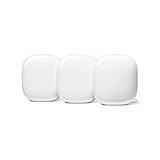
Google Nest WiFi Pro - 6E - Reliable Home Wi-Fi System with Fast Speed and Whole Home Coverage - Mesh Router - 3 Pack…
Best for: simple households, modern devices
Watch outs:
Yes. The key is your modem/gateway mode and avoiding double-NAT.
Not always. Many people keep the ISP gateway and run mesh in AP mode.
Two routers doing NAT can break gaming/port-forwarding and cause weird connectivity issues.
If your ISP supports it, bridge mode + your mesh as the router is a clean setup.
Yes—especially if your gateway is stuck in a corner or utility room.